I spent three weeks building a custom TV channel system for vacation rentals. The idea was simple: instead of guests flipping through cable garbage or staring at a default Fire Stick home screen full of ads, they’d turn on the TV and see something actually useful. A welcome message with their name, the Wi-Fi password, house rules, local restaurant picks, checkout info. All of it running on a loop, on a real TV channel, powered by a stack I control.
The project is called Hospitality Channels. It took ~200 commits and more late-night FFmpeg debugging than I’d wish on anyone. It also became one of the more interesting AI-assisted coding experiments I’ve done.

Why Bother
If you’ve ever stayed somewhere with an in-room Fire Stick, you know the experience. You turn it on, get hit with Amazon’s home screen, maybe an ad for a show you’ll never watch, and then you’re expected to log into your own Netflix account on a device you’ll use for two nights. It’s not a great guest experience. It’s not any guest experience.
Hotels solve this with expensive IPTV systems from vendors who charge per-room monthly fees for the privilege of displaying a logo on a channel guide. For a vacation rental or small boutique property, that’s overkill. I wanted something self-hosted, free, and actually tailored to making a guest feel welcomed. Not sold to.
The technical answer turned out to be Tunarr and Dispatcharr. Tunarr creates virtual TV channels from media files and serves them as IPTV streams. Dispatcharr acts as the channel dispatcher, organizing and routing those streams so a Fire Stick (or any IPTV client) can tune in like it’s regular television. Together, they turn a pile of MP4 files into something that feels like a real TV channel.
The missing piece was the content. I needed a way to design, render, and manage video content that’s actually relevant to hospitality. That’s what Hospitality Channels does.
What It Actually Does
At its core, it’s a media production pipeline with a web UI. You pick a template, fill in the fields, and it renders a video clip. You assemble clips into programs with background music, and push the result to a Tunarr channel. The guest turns on the TV and sees a polished, looping channel with everything they need to know about the property.
The system has three pieces: a Next.js web app for the admin UI and API, a background worker that handles rendering (headless Chromium for screenshots, FFmpeg for video encoding), and a shared package layer in a pnpm monorepo covering the data model, render pipeline, Tunarr API client, and template registry. The whole thing ships as a single Docker container with SQLite.
Templates for Guest Joy
I built 11 templates targeting the content types that actually matter when someone walks into a rental property:
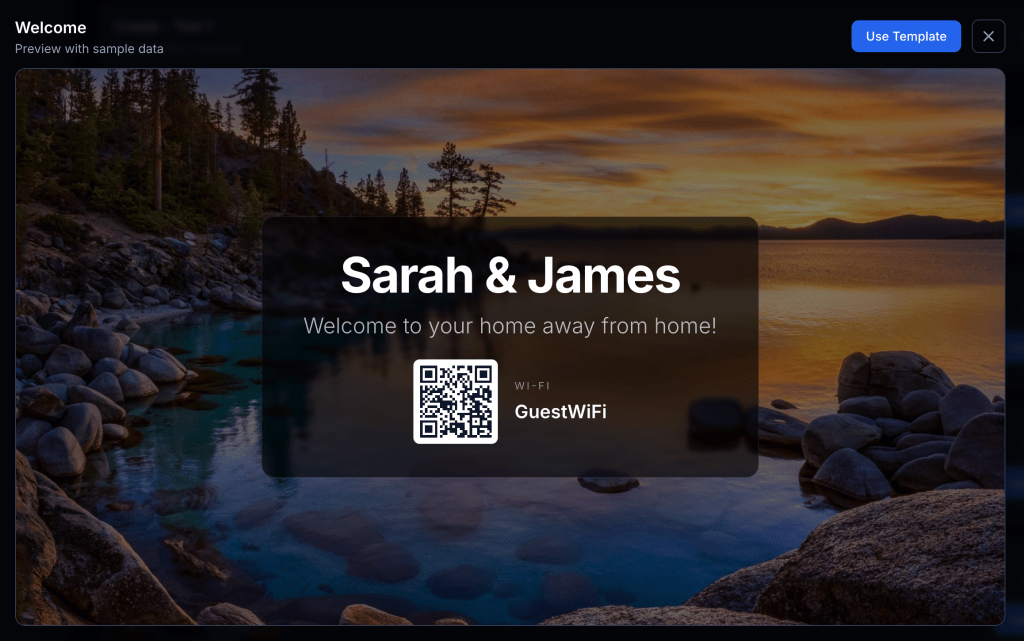
Welcome and Hotel Welcome are personalized greetings. The guest sees their name on the screen when they turn on the TV. It’s a small thing, but it sets a tone. There’s also an auto-generated QR code for the Wi-Fi so nobody has to squint at a laminated card on the nightstand.
House Guide (three layout variants) covers Wi-Fi credentials, house rules, and property info. The stuff guests always ask about in the first 20 minutes.
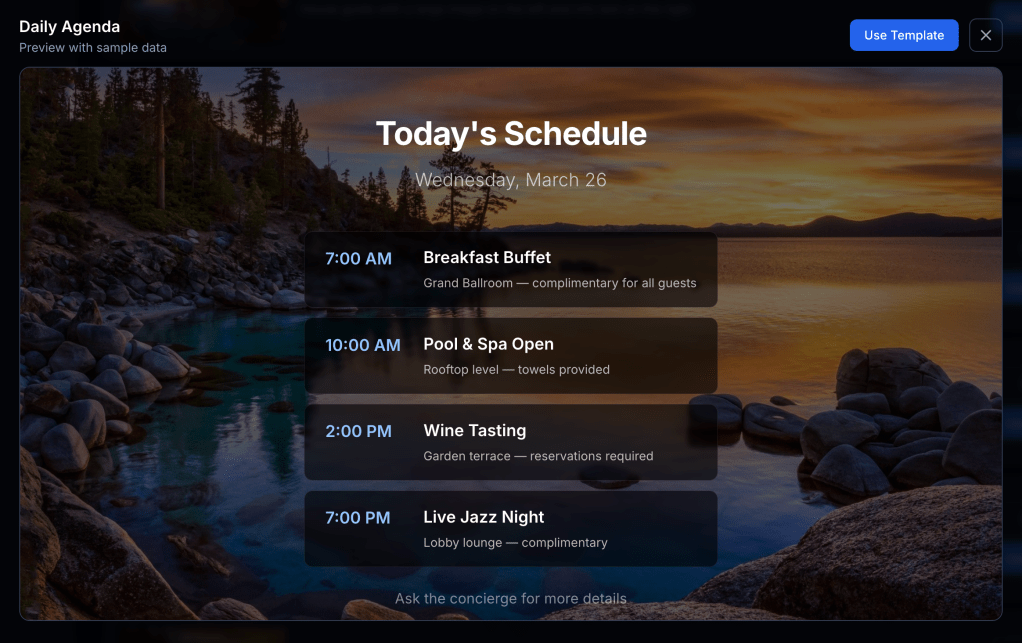
Daily Agenda supports up to four time-slotted items. Useful for properties that run activities or have scheduled amenities.
Local Info handles restaurant recommendations and nearby attractions. The kind of thing that used to be a three-ring binder on the coffee table.
Amenities, Checkout, Contact Directory, Emergency Info. All the operational stuff that guests need but rarely seek out until they need it urgently. I don’t think these will be around for very long since they’re too formal. I’m actually moving towards more generic layouts instead of specific use cases.
Every template supports background images with frosted-glass overlays, background audio, Markdown in text fields, and (after some painful work I’ll get to) video backgrounds. The goal was to make these look like something a guest would actually glance at, not a PowerPoint from 2008.
The Tunarr + Dispatcharr + Fire Stick Stack
This is where it gets fun, and also where the Fire Stick earns its boos.
The content pipeline goes: Hospitality Channels renders MP4 clips → assembles them into programs → publishes to Tunarr, which creates a virtual IPTV channel → Dispatcharr picks up that channel and makes it available as an IPTV stream → the Fire Stick 👎 runs an IPTV player app (like TiviMate or IPTV Smarters) and tunes to the channel.
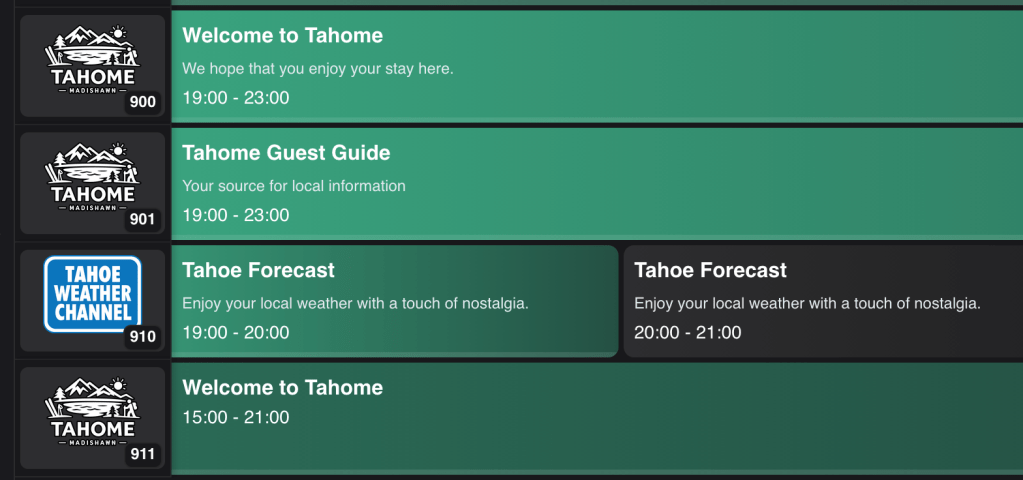
The result is that a guest turns on the TV and sees a channel. Not an app launcher, not a login screen. Just a channel playing a welcome reel with their name, the house rules, and local recommendations, all looping with background music. It feels like a hotel experience, which is exactly the point.
The Fire Stick, though. Boo the Fire Stick. Getting an IPTV player to launch automatically on boot, stay in the foreground, and not get interrupted by Amazon’s own UI pushing updates and ads is its own category of annoyance. The hardware is cheap and everywhere, which is why it wins for deployments, but Amazon really does not want you using it as a dedicated IPTV display. Every OTA update is a game of “what did they break this time.” If you’re considering this kind of setup, budget time for Fire Stick wrangling. It’s not a Hospitality Channels problem. It’s a “you bought the cheapest streaming stick and now you’re fighting the platform” problem.
AI-Assisted Coding: How This Actually Got Built
I leaned heavily on AI coding tools for this project, and it’s worth being specific about where that helped and where it didn’t.
The good: scaffolding. Getting a Next.js app router project set up with Drizzle ORM, SQLite, pnpm workspaces, Turborepo, Docker. There is so much boilerplate in a modern TypeScript monorepo and AI tools chewed through it fast. Same with the Zod schemas, API route handlers, and React components for CRUD operations. That’s the kind of code where you know exactly what you want but typing it out is just time. AI handled it well.
Template design was another strong spot. Describing a layout in natural language (“a welcome card with a large guest name, frosted glass overlay, Wi-Fi QR code in the bottom right”) and getting back a working React component with Tailwind styling was genuinely productive. Iteration was fast. I could tweak the prompt, re-render, and see the result in the browser in seconds.
Where it fell apart: anything involving FFmpeg. AI tools will confidently hand you an FFmpeg command that looks plausible and is subtly wrong in ways that only surface when you test with a video file that has a different pixel format or frame rate than the one you started with. The video background compositing feature took five commits to get right, between incorrect alpha handling, wrong z-ordering, pixel format normalization issues, and fractional frame rate edge cases. Each of those bugs required actually understanding what FFmpeg was doing, not just describing what I wanted.
The Docker + ESM + monorepo situation was similar. AI tools would suggest Dockerfile configurations that worked for simple cases but collapsed when you introduced pnpm workspace symlinks, multi-stage builds, and a separate worker entrypoint with different module resolution behavior. That battle consumed most of the first two weeks and was largely me reading error messages, not prompting.
The honest summary: AI coding tools made this a three-week project instead of a six-week project. They’re excellent at the high-volume, well-understood parts. They’re unreliable for the parts where you’re debugging interactions between multiple systems that each have their own edge cases. Knowing when you’re in which zone is the actual skill.
The Pain Points
Docker + ESM + Monorepo (The Two-Week Tax)
The most time-consuming problem, hands down. pnpm workspaces use symlinks to link internal packages. That’s fine locally. In a Docker multi-stage build, copying node_modules doesn’t preserve symlinks, and the worker process had different module resolution behavior than the Next.js app.
I went through probably a dozen Dockerfile iterations. The fixes involved switching from symlink-based resolution to copying real package content, being careful about build context paths, and sorting out how tsconfig path aliases interacted with compiled output. Never one clean fix, just a series of small corrections that each unblocked the next problem.
Lesson: ESM + monorepo + Docker is not a solved problem. Budget accordingly.
FFmpeg Compositing (Five Commits, One Feature)
Adding video backgrounds to templates was the most iterative single feature. The problems were layered: incorrect transparency handling, wrong z-ordering, pixel format normalization, fractional frame rate edge cases in the filter graph, and a CWD-dependent asset path resolution bug.
I’d also been using FFmpeg’s slow encoding preset for quality. For looping hospitality content on a Fire Stick, fast is more than adequate and cut render times significantly.
Audio Assets Returning 403
Once programs were working, audio tracks weren’t making it into rendered videos. The worker was fetching audio via the web app’s API and getting 403 errors. The bug: asset file paths resolved relative to the process’s working directory. The web app’s CWD resolved correctly. The worker’s didn’t. Fix was explicit path resolution against the configured assets directory, plus proper MIME type handling for all the audio formats I’d forgotten about.
The Little Things
Duplicate publish profiles accumulating on every server restart due to a read-then-write race condition. Programs showing as “Untitled” in Tunarr because I was pushing the file but not the metadata. Tunarr’s API returning stale channel data from a client-side cache, making it look like publishes weren’t working when they were. Hardcoded library IDs that worked in dev and nowhere else.
None of these were hard to fix once identified. They were hard to identify because everything looked like it was working until you checked carefully.
The Program Composer
This is probably the most satisfying part of the UI. You drag clips into a program, set their order, add audio tracks, configure transitions (fade, wipe, slide), and set duration modes (either auto-matched to the audio length or manual). There’s a minimum clip duration control for pacing so a single slide doesn’t flash by too fast.
When you hit render, the worker stitches everything together: individual clip MP4s concatenated via FFmpeg’s concat demuxer, audio mixed with the amix filter, loop transitions for seamless playback. The output is a single MP4 that goes straight to Tunarr.
What I’d Do Differently
Get Docker working end-to-end before writing features. I lost a lot of time building against a local dev setup and then discovering the same code behaved differently in a container. Docker-first would have made every subsequent debugging session faster.
Test the render pipeline with diverse media from day one. Most FFmpeg bugs surfaced when I tried formats and codecs I hadn’t tested initially. A small fixture library covering different video formats, frame rates, and audio codecs would have caught these earlier.
Name things correctly from the start. I originally called clips “pages.” It was the wrong mental model. Renaming across the whole codebase was the right call but it touched a lot of files and took a couple of hours.
Figure out reasonable content and layout. Rewrite after rewrite as I get more excited. I should have known I’d get things figured out so I should’ve come in with some real ideas besides “I want transparent backgrounds on top of cool photos like Marriott does”.
Where It’s Going
The system works well for my current use cases, but there’s more I want to build: time-based program scheduling so a channel can switch between daytime and nighttime playlists, more templates (weather is the obvious next one), multi-property support so one instance can manage multiple venues, and eventually a visual template editor so you don’t need to write code to create new layouts.
I recently forked and changed ws4kp to have a nostalgic local weather channel alongside the guest channels. I feel like there is an obvious middle-ground that I’d like to find. This whole project relies on prerendered videos but it would be nice to be able to have streaming programs with live data as well.

The monorepo structure and typed data model make all of that approachable. The foundation is solid. Given the Docker situation in week one, that’s something I’m allowed to feel good about.
If you’re running Tunarr and want custom content channels for a property, or you’re just curious about what AI-assisted coding looks like on a real project with real edge cases, the project is on GitHub.
 Shawn Blog
Leave a comment